
Save time schedule automatic Facebook posts
Did you know that completing similar tasks all at once saves you time in the run long run?
Boost your productivity by scheduling posts that are appropriate around holidays and events, brainstorming content
ideas, exploring inspiration, and staying focused without getting sidetracked by social media.
Imagine if you had a tool that allowed you to schedule all your posts in advance. It would save you so much time!
Planning out posts every single day can feel overwhelming. And don't forget about those weekends and holidays when
you don't want to be tied to your work devices.
Stay connected with your customers or clients, by remind them every day that you're always here to offer them
products and services.
Ok here’s the good part! There’s online services that can help you with this.
Some are free and some are paid, and some even cross post over several different social sites.
Here’s the one I use. On Facebook, because this is where I get most of my new leads.
1.
Go here…
2.
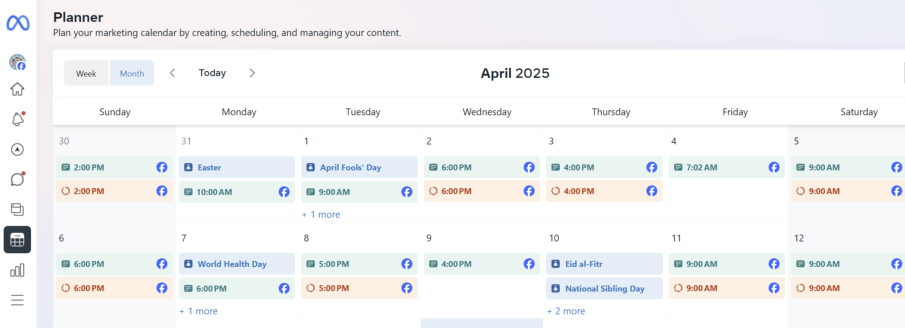
Meta Facebook Business Planner
3.
Then click on “Create Post”
Subjects to consider when posting.
•
Small Business Days to Observe
•
US Holidays to Observe
•
Local Events (on Facebook)
•
Promotions
•
Ask a question
•
Inspirational quote
•
Share a tip or hack
•
Testimonial
•
Highlight new service
•
Free resources
•
Contest / giveaway
•
Braking news
•
Thank your fans
•
Highlight a biz
•
Fun facts
•
Industry article
•
Comic
•
Holiday post
•
Weather post
•
Interesting statistic
•
In case you missed it - old blog post
TIPS
•
You can schedule posts on Meta Business Suite up to 29 days in advance for both Facebook and Instagram.
•
You can schedule up to 25 posts per day.
•
Typically, users can schedule up to 50 posts per profile or page at a time.
•
Use hash tags. They improve viewer counts.
•
Always put a link to your website at the bottom of each post.


Save time schedule automatic
Facebook
posts
Did you know that
completing similar tasks all
at once saves you time in
the run long run?
Boost your productivity by
scheduling posts that are
appropriate around
holidays and events,
brainstorming content
ideas, exploring inspiration, and staying focused without
getting sidetracked by social media.
Imagine if you had a tool that allowed you to schedule all
your posts in advance. It would save you so much time!
Planning out posts every single day can feel overwhelming.
And don't forget about those weekends and holidays when
you don't want to be tied to your work devices.
Stay connected with your customers or clients, by remind
them every day that you're always here to offer them
products and services.
Ok here’s the good part! There’s online services that can
help you with this.
Some are free and some are paid, and some even cross post
over several different social sites.
Here’s the one I use. On Facebook, because this is where I
get most of my new leads.
1.
Go here…
2.
Meta Facebook Business Planner
3.
Then click on “Create Post”
Subjects to consider when posting.
•
Small Business Days to Observe
•
US Holidays to Observe
•
Local Events (on Facebook)
•
Promotions
•
Ask a question
•
Inspirational quote
•
Share a tip or hack
•
Testimonial
•
Highlight new service
•
Free resources
•
Contest / giveaway
•
Braking news
•
Thank your fans
•
Highlight a biz
•
Fun facts
•
Industry article
•
Comic
•
Holiday post
•
Weather post
•
Interesting statistic
•
In case you missed it - old blog post
TIPS
•
You can schedule posts on Meta Business Suite up to 29
days in advance for both Facebook and Instagram.
•
You can schedule up to 25 posts per day.
•
Typically, users can schedule up to 50 posts per profile or
page at a time.
•
Use hash tags. They improve viewer counts.
•
Always put a link to your website at the bottom of each
post.
Your Designs Online